
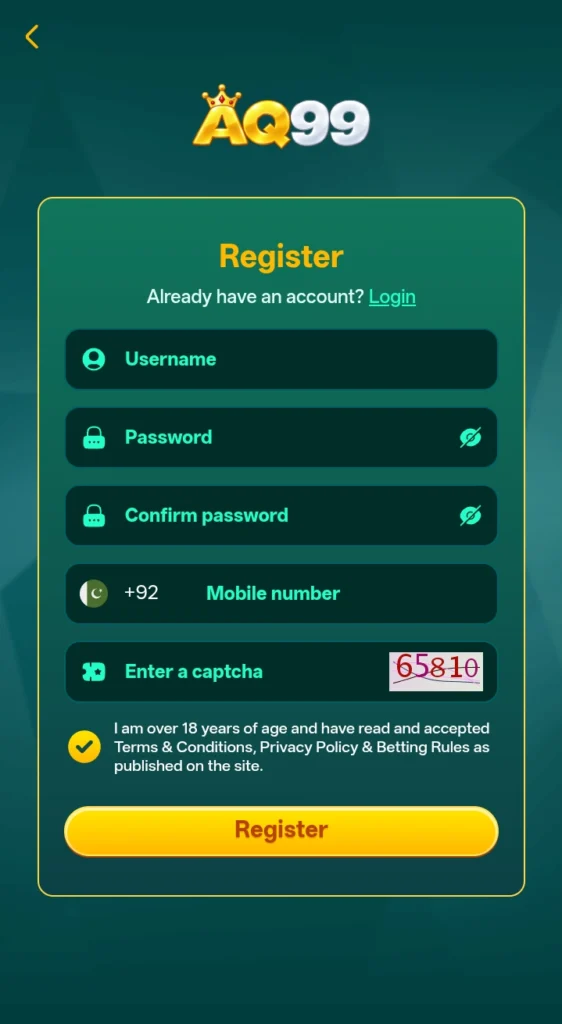
After downloading the AQ99 game, the first step to access the platform’s features is to create an account, which is a simple process. The process is simple and quick. Users can enter the required details, such as their active mobile number and other basic information, and then complete the sign-up process. Once the account is created, they can log in and access the available features of the platform.
Press the button shown here and register for the game immediately.
Requirements Before Registering
How to Complete the AQ99 Registration Process?
Open the game
After installing the game, open the application on your device. Look for the Register or Sign Up option on the main screen to begin creating your account.
Enter Your Mobile Number
Enter an active mobile number in the registration field. Make sure the number is correct because it may be needed for account verification or future account access.
Create a Password
Choose a password that you can remember, but that is not easy for others to guess. Enter it carefully in the required field and check for any typing errors. Passwords must contain a mix of letters, numbers, symbols).
Fill In the Required Details
Complete the registration form with the basic information requested by the platform. Use accurate details and avoid entering incorrect information, as this can cause problems when accessing your account later.
Check the Information
Before submitting the form, review the mobile number, password, and other details you entered. A quick check can help you avoid common registration mistakes.
Submit the Registration Form
Once all the required fields are complete, select the Register or Sign Up button. If the information is accepted, your AQ99 account should be created.
Log In to Your Account
After registration, return to the login page and enter your registered details. Once logged in, you can access the features available through your game account.
Benefits of AQ99 Registration
Tips for a Successful Registration
Common Registration Problems: How to Solve Them?
Mobile Number Not Accepted
Check that you have entered the correct mobile number and that it is active. Try again after checking for typing errors.
Verification Code Not Received
Wait for a short time and check that your mobile network is working. If the code still does not arrive, request a new one if the option is available.
Registration Form Shows an Error
Review all required fields and make sure the information is entered in the correct format. Then submit the form again.
Password Not Accepted
Create a password that follows the requirements shown on the registration page. Avoid simple passwords that may not meet the platform’s rules.
Account Already Exists
If your mobile number is already linked to an account, use the login or account recovery option instead of creating another account.
Page Is Not Loading
Check your internet connection and try refreshing the page. You can also close and reopen the game before trying again.
Final Words
AQ99 game registration is a simple process when you have your basic details ready and enter the information carefully. Make sure your mobile number is active, check the registration form before submitting it, and keep your login details secure. After creating your account, you can sign in and use the features available on the platform. Always follow the current registration requirements and terms provided by the game.